



MyClassSync is a complete class management system designed to centralize school and tuition administration into one intuitive mobile app. MyClassSync organizes class schedules, student and faculty records, attendance, fees and homework so administrators and teachers spend less time on paperwork and more time on instruction. The app's interface is built for daily academic workflows across single- and multi-branch institutions and includes role-based access to keep data consistent and secure.
How the system works
The core workflow in MyClassSync maps real-world academic structures into digital modules: branches, standards or grade levels, subjects and batches. Administrators define branches and class hierarchies, assign staff roles, and create subject and course templates that can be reused each term. Course creation supports linked curricula so teachers can attach syllabi and lesson outlines to specific classes. Attendance, homework and test scheduling are recorded against these linked records so a student’s progression is visible in context.
Controls and navigation
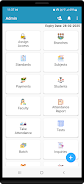
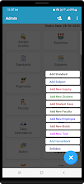
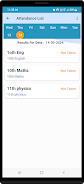
Navigation is designed for quick access to day-to-day tasks: a primary dashboard summarizes pending tasks such as pending fee receipts, upcoming tests and unassigned homework. Teachers and staff use clear form-based entry screens for marking attendance, logging fees or creating assessments. Role-based menus limit which controls appear for each user type so teachers see classroom tools while administrators access reporting and settings.
Progress tracking and assessment
Student progression is tracked through attendance records, test scores and homework completion. MyClassSync supports flexible assessment schemes so institutions can record numeric grades, qualitative remarks or pass/fail outcomes depending on their evaluation style. Consolidated student profiles show historical data across terms and branches, enabling teachers to monitor improvement and prepare individualized support plans.
Visual style and user experience
The visual approach favors clarity and readability: clean lists, clear labels for classes and batches, and consistent color coding for status indicators. Screens prioritize content density appropriate for mobile devices while keeping important actions accessible with a minimum number of taps. The app emphasizes predictable behavior so staff can complete frequent tasks like attendance or fee entry quickly without extensive training.
Customization and configuration
Administrators can customize standards, subject groupings and role permissions to match institutional policies. Batch and timetable configuration allows organizations to define session lengths and recurring class patterns. Template features let staff save frequently used forms for admissions or payment receipts to accelerate repetitive workflows and maintain consistency across users and branches.
Reporting, export and data use
Reporting features compile attendance summaries, fee ledgers and test performance into clear tables suitable for review meetings or parent communication. The app supports filtered views by class, branch or date range so staff can extract meaningful trends. Export-ready summaries and printable lists help institutions integrate MyClassSync outputs into existing administrative procedures.
Accessibility, low-bandwidth use and device support
MyClassSync is developed with accessibility in mind: readable fonts, clear contrast and form controls that work well on a range of screen sizes. The app is optimized to perform reliably on low-bandwidth connections, ensuring staff can complete core tasks even when network conditions are variable. This makes it practical for campuses with limited connectivity or for field enrollment activities.
Security, roles and data integrity
Role-based access control is a central feature: administrators assign permissions to limit who can view or modify records. The system encourages consistent data entry through validation rules and prompts to reduce duplicate student and faculty entries. Regular backups and export options give institutions control over their records and help with audit and compliance procedures.
Setup, maintenance and limitations
Initial configuration and data migration can require time, especially for large institutions with historical records; planning for staged imports and role assignment is recommended. Organizations with highly specialized workflows may need additional customization beyond the app’s standard modules. Ongoing maintenance — assigning correct roles and keeping class templates current — ensures the system remains accurate and useful.
Who benefits
MyClassSync is best suited to schools, coaching centers and training programs that need a single app to manage admissions, daily attendance, fee tracking and assessment scheduling across multiple branches. By centralizing records and offering configurable modules, the app reduces duplication of effort and makes routine administration more predictable and transparent for staff and leadership.
Category: Finance Publisher: ITVL Solution File size: 33.22M Language: English Requirements: Android Package ID: com.myclass.sync





















