



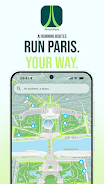
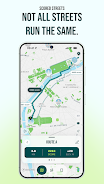
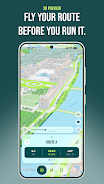
RunninParis turns ordinary runs into informed city explorations by generating AI-assisted routes across Paris tailored to comfort, scenery and pace. Type a start address, pick loop or itinerary mode and receive suggested paths ranked with official Paris open data — sidewalk width, tree coverage, pedestrian zones and parks — so you can choose runs that feel safer, greener or more scenic while still matching your distance and cadence goals. The app supports 3D route previews and GPX export for wearable devices, and its clean running view keeps your focus on the road and your rhythm.
Key features and route mechanics
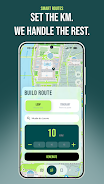
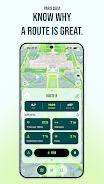
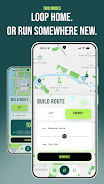
The core mechanic is route generation: RunninParis creates options based on a combination of user inputs and city data. Enter a start point, set a target distance or estimated time, choose loop or point-to-point itinerary, and select a desired pace. The generator balances those goals against pedestrian-friendly indicators such as sidewalk width, tree density and park proximity to produce multiple candidate routes. Each route comes with a clear score breakdown and a visual comparison so you can quickly see tradeoffs between directness, greenery and perceived comfort.
Controls and map interaction
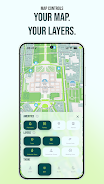
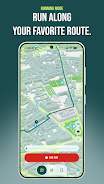
Controls are intentionally simple to stay useful on the move. On the planning screen you type or drop a pin for the start, drag waypoints to modify an itinerary and tap to toggle overlays. During a run, a minimalist Running Mode shows a live blue dot that traces your position and pace without clutter. Map gestures let you zoom, pan and inspect specific segments while 3D preview lets you virtually fly the route before you step outside. Export buttons allow quick GPX saves for use on watches and third-party fitness apps.
Progression, personalization and challenge systems
RunninParis focuses on personal progression rather than competitive ladders. The app keeps a local history of your saved routes and completed runs so you can track distance milestones, personal bests for time on familiar loops and streaks of regular activity. You can create custom challenges like repeating a favored route X times or gradually increasing weekly distance targets; these are stored on-device and designed to motivate steady improvement without requiring online accounts or rankings.
Customization and visual style
The map and interface are crafted for clarity and quick decision making. Choose from several map themes optimized for daylight or night runs, enable high-contrast elements for better visibility, and toggle overlays that surface sidewalks, tree cover and pedestrian zones. Route score breakdowns are shown with simple charts and color cues so you understand why one path might feel quieter or greener than another. The overall visual approach favors legibility and low distraction while you move.
Level structure, replay value and route discovery
Rather than levels, the app encourages exploration by regenerating routes from the same start with different priorities. Replay value comes from variability: change the distance, swap preferences from scenic to direct, or ask the AI to emphasize parks and shaded streets and you will often get a fresh route that reveals new neighborhoods. Regular users can build a library of favorite loops and itineraries to rotate through training cycles or sightseeing runs.
User experience and accessibility
Accessibility is built into the interface: large touch targets, a minimalist running display, color themes for visibility and optional audio cues for basic turn prompts during a run. The focused Running Mode reduces on-screen noise so you can concentrate on footing and surroundings. Settings let you keep the screen on during activity or conserve battery by dimming the map while still tracking your position.
Offline use and device compatibility
RunninParis supports offline-ready workflows by allowing you to preview and cache planned routes and their essential map tiles before heading out, which helps in areas with spotty reception. Exported GPX files are compatible with many watches and fitness apps so you can take a saved route onto a device that provides turn-by-turn guidance. Keep in mind GPX navigation requires a compatible watch or third-party app to follow routes on-device.
How route scoring works
Routes are scored using Paris open datasets that reflect measurable pedestrian attributes: sidewalk width, tree canopy, pedestrian-only zones and proximity to parks. These objective inputs are combined into transparent scores you can inspect; the intent is to make recommendations understandable rather than opaque. Locals and visitors alike will appreciate seeing why a suggested path favors quieter, greener or more direct streets.
Limitations and ideal use cases
RunninParis is optimized specifically for Paris because its scoring depends on city open data; it is not designed as a global routing tool. For best results use it inside Paris and export GPX files if you want on-device navigation on a watch or fitness unit. If you want a minimalist, data-informed way to discover scenic streets, plan safer walks or vary training routes across Paris neighborhoods, RunninParis is built to make those outings easier and more enjoyable.
Category: Lifestyle Publisher: Luca Perrin File size: 79.91M Language: English Requirements: Android Package ID: com.runninparis.app





















