




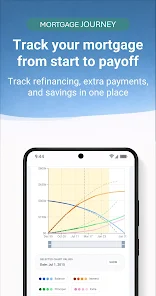



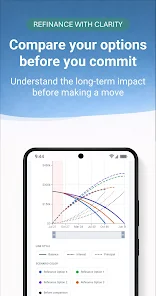
Mortgage Pilot is a focused mortgage and refinance utility designed to help homeowners and home buyers understand a loan from origination through payoff. Mortgage Pilot combines a mortgage calculator, refinance comparison tools and a detailed amortization tracker so you can plan payments, test extra payments, and visualize how principal, interest, escrow, PMI, loan balance and home equity change month by month while keeping your data local to the device.
Key features
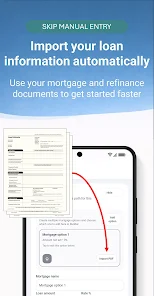
The app provides a full mortgage calculator with detailed amortization schedules and month-by-month breakdowns so you can inspect every payment period. A refinance comparison tool lets you place your current loan side-by-side with one or more refinance scenarios to compare monthly payments, total interest, and break-even points. An extra payment planner supports one-time, recurring, or custom extra payments and shows the estimated interest savings and earlier payoff dates. You can import supported mortgage disclosure documents to prefill loan information and reduce manual entry, and you can export amortization schedules and comparison reports to PDF or Excel for record keeping or sharing with advisors.
How it works
Mortgage Pilot shows a clear timeline and supports flexible inputs: loan amount, interest rate, term, start date, escrow, PMI, and custom fees. The app generates a month-by-month table and an amortization chart to illustrate how each payment is split between principal and interest and how the loan balance evolves. Side-by-side comparisons are organized into named scenarios so you can save and revisit different plans without re-entering data. Scenario management includes options to duplicate, rename or archive entries to keep your workspace tidy as you test possibilities.
Controls and user experience
The interface is optimized for touch: numeric fields accept direct typing and stepper controls for fine adjustments, while sliders provide a fast way to preview the impact of interest rate and payment changes. Form fields include helpful units and inline validations to reduce input errors, and common presets such as 15-year and 30-year terms speed setup. Interactive charts respond to taps so you can jump from a visual point to the corresponding monthly detail, and export functions are accessible from each scenario view for quick reporting.
Visual style and reports
The visual design focuses on clarity: graphs use contrasting colors for principal vs interest, and tables display running totals for escrow, PMI and home equity alongside remaining balance. Reports are formatted for printing or sharing; exported PDFs include both chart snapshots and the complete amortization schedule, and Excel exports preserve the month-by-month columns so you can perform further analysis. These visual and printable outputs make it easier to discuss options with lenders, financial planners or co-borrowers.
Progression, planning and replay value
Rather than game-like levels, Mortgage Pilot provides progression through planning stages: initial estimate, side-by-side refinance evaluation, extra-payment experiments, and long-term payoff strategies. Replay value comes from testing different assumptions—altering rates, terms, or extra-payment patterns reveals how even small changes affect total interest and payoff date. The app supports multi-scenario comparisons so you can build and refine a sequence of plans as market conditions or personal finances change.
Customization, accessibility and offline use
You can customize labels, show or hide columns in the table, and adjust display density to suit smaller screens. The app is local-first and functions without creating an account, which means you can use Mortgage Pilot offline and keep scenarios on the device. Accessibility considerations include clear labels and large touch targets; numeric entry is straightforward and screens remain readable at larger font sizes so the app is usable by a wide range of users.
Limitations and compatibility
Mortgage Pilot intentionally keeps data local and does not include cloud sync or server-side account storage; this design protects privacy but also means scenarios are not automatically available across multiple devices. Import is limited to supported mortgage disclosure document formats and may not accept every file type or layout; if a document fails to import you can still enter loan details manually. Exported PDFs and Excel files are generated on-device and can be shared using the Android share mechanisms supported by your device.
Category: Finance Publisher: Florent Tixier File size: 16.00M Language: English Requirements: Android Package ID: com.mortgagepilot.app





















