




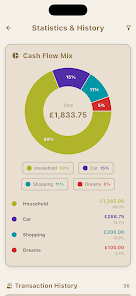


Stuffrite brings clarity to personal finances by combining a modern envelope budgeting approach with a forward-looking projection engine that shows how real balances are likely to evolve over the coming months. Instead of only recording past transactions, the app forecasts scheduled bills, recurring habits and internal transfers so users can see whether a purchase today might affect available cash weeks from now. The interface is designed for people who prefer automated rules, clearer cash flow visuals and simple ways to share specific budgets with a partner without exposing every account on the device.
Key Features
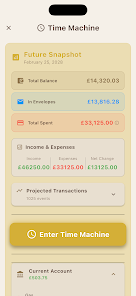
The Time Machine in Stuffrite projects future account balances using scheduled bills, saved spending patterns and planned transfers. You can run scenarios to test whether a one-off purchase or a change in habit will create shortfalls later, and the projection horizon is configurable so you view weeks or months of outlook at a glance.
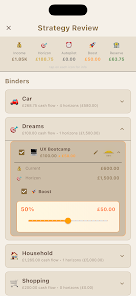
Envelope-style budgeting lets you create virtual containers for bills, day-to-day spending, sinking funds and savings goals. Each envelope tracks its own balance, assigned inflows and scheduled outflows so money is only spent from the categories you designate, and the app shows clear visual cues when envelopes need topping up.
Account Mirror Mode links envelopes to real bank accounts so balances within the app reflect your actual funds and spending activity reduces the linked envelope balances automatically. Linking is optional and can be limited to only the accounts you choose; the core design keeps financial data local to your device unless you opt into sharing.
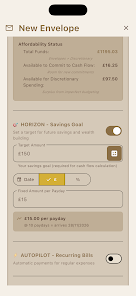
Autopilot and Horizons automate transfers between envelopes based on rules you define. Set recurring allocations for payday, configure a priority order for debt repayment or savings, and let the automation move money where it’s needed without manual intervention. Rules are editable and you can pause automation if you want to test different approaches without committing changes.
Workspace Mode supports simple sharing of specific envelopes with a partner or household member while keeping other accounts private. This selective sharing is intended for joint bills like rent or groceries so collaborators see only the buckets you choose to share rather than all transaction history.
How it Works and Controls
Interaction is driven by concise touch controls: tap to inspect an envelope, swipe to record or categorize a transaction, and use straightforward forms to create scheduled bills and transfers. The onboarding guides you through setting up envelopes, linking accounts and defining rules, with contextual help available on each screen. There is no mandatory bank linking; manual entry and import options let you maintain full control if you prefer to keep accounts unconnected.
Progression, Goals and Challenge Systems
Progression is based on goal milestones and savings targets rather than levels. You set target amounts and timelines, the app tracks progress visually and notifies you when milestones are reached or when projections indicate you are off-track. For users focused on debt reduction, payoff plans let you prioritize balances and simulate accelerated payment schedules to test different payoff strategies and compare total interest outcomes.
Customization and Visual Style
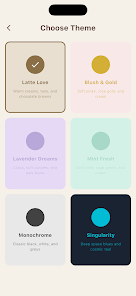
Visual design emphasizes clarity and minimal distraction: color-coded envelopes, simple charts for near-term cash flow, and compact schedule views make it easier to absorb information quickly. You can rename and colorize envelopes, rearrange priority orders, and choose how dense or summarized the interface appears, which helps adapt the experience for short daily checks or deeper planning sessions.
User Experience, Accessibility and Offline Use
The app follows local-first storage principles so most functionality remains available offline; scheduled rules and projections compute on-device without sending data to external servers. Offline operation supports users who prefer privacy or have limited connectivity. Accessibility features include scalable text sizes and compatibility with standard Android accessibility services, and the app attempts to keep controls large and reachable for comfortable one-handed use.
Setup Considerations and Limitations
Getting the most out of the system benefits from an initial setup effort: creating envelopes, defining recurring bills and tuning automation takes time and a short learning curve. Account Mirror Mode requires linking real accounts for automatic deductions, which some users may choose to avoid. Because data is stored locally by default, seamless multi-device syncing depends on using the app’s sharing features or manual transfer methods.
Advantages
By combining envelope budgeting with forward-looking projections and rule-based automation, users gain a clearer picture of where cash will be weeks or months ahead, reduce surprises from scheduled bills and feel more confident about day-to-day spending. The selective sharing model also supports practical collaboration on shared expenses without exposing full financial histories.
Overall, Stuffrite helps replace financial guesswork with predictable plans by offering clear visuals, configurable automation and a privacy-conscious data model that supports offline use and flexible sharing options.
Category: Finance Publisher: Warming Neon Ltd File size: 52.00M Language: English Requirements: Android Package ID: com.stuffrite.app





















