




WhenSpace is a focused productivity workspace that brings tasks, timed events and habits together so you can start each day with a clear plan instead of switching among multiple apps. WhenSpace surfaces what matters this morning by combining a unified Today view with simple task controls, habit streak visualization and lightweight planning tools so you see overdue items, hourly events and progress at a glance.
Key features and what they do
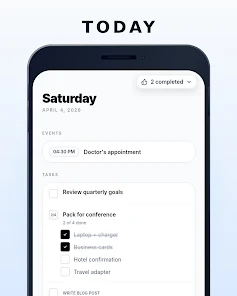
The Today screen combines timed events, quick check‑offs and habit check‑ins in one place to reduce context switching. Timed events and hourly entries are shown next to tasks so you can plan work around appointments and avoid double‑booking your day. Overdue items are promoted visually, making it easy to address what was missed without hunting through separate lists.
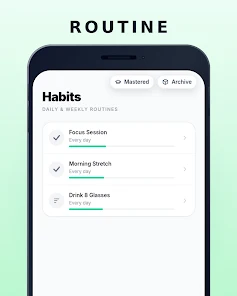
Tasks in WhenSpace come in three practical types: single tap check‑offs for brief items, multi‑item checklists for compound tasks, and a step‑by‑step flow that reveals only the current step to keep momentum without distraction. Habit tracking includes a visual progress bar that communicates streak length and progress toward the commonly referenced ~66‑day formation threshold, and habits can be logged as simple check‑ins, numeric counts or durations to fit real behaviors.
Interaction model and controls
WhenSpace favors direct, low‑friction controls so you spend time doing, not fiddling. Tap to complete an item, hold to edit details, and use intuitive gestures to reorder work in your Today view. Creating a task or habit uses minimal fields: a title, optional timing, and the preferred input mode for habits (check, count, duration). The step‑by‑step task type advances one step at a time so you can focus on the next action without losing the larger plan.
Progression, habits and motivation
Progression in WhenSpace is centered on consistency rather than points. Habit streaks, visual bars and clear streak counts make it easier to notice momentum and nudge behavior toward a routine. You can tailor habit inputs to your goals: log repetitions for workouts, counts for pages read, or durations for focused work. The app shows how routines accumulate day to day, helping users turn single tasks into longer patterns without gamified distractions.
Visual style, customization and layout
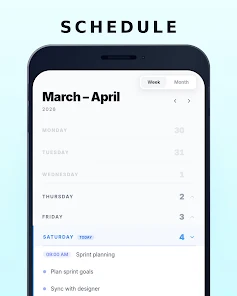
The design is intentionally calm: sparse month views show only days with content to reduce noise, while a compact 7‑day planning band gives a quick forward view. Customization options focus on clarity — choose how much detail appears on the Today screen and whether checklists display inline or collapse to a summary. The result is a workspace that adapts to whether you prefer a pared‑down morning plan or a slightly fuller week overview.
Planning structure and workflow
Planning in WhenSpace revolves around a small set of views that map to common workflows. Use the Today view for immediate execution, the 7‑day view for near‑term planning and the sparse month for a lightweight calendar perspective. A Someday bucket captures undated ideas and project seeds so they do not clog daily priorities. The three task types and Someday list work together: break a project into a step flow, schedule specific steps as timed events or keep less urgent things in Someday until they are ready.
Accessibility, offline use and user experience
WhenSpace emphasizes readability and simple interactions to help accessibility: large touch targets, concise item titles and an uncluttered interface reduce cognitive load. Core features remain usable without a constant network connection so you can review your day and check off tasks offline; changes sync when connectivity is available. The app avoids needless animations and options so the interface stays fast on a wide range of devices.
Replay value, challenges and limitations
Because it centers on daily routines and habit streaks, WhenSpace encourages repeat use: each morning presents a fresh but familiar workspace that updates with progress and carryover items. The challenge system is implicit rather than competitive, relying on streaks and gradual habit thresholds rather than points, making it suitable for sustained, private self‑improvement. Limitations include the sparse month view, which may feel too minimal for users who prefer dense, traditional calendars, and the hidden future steps in step‑by‑step flows that may frustrate planners who want to see an entire project at once. Also, users who need complex multi‑project management features may find the single‑view focus intentionally limiting.
Overall, WhenSpace provides a calm, integrated environment for daily planning and habit work: it reduces switching between apps, highlights what is overdue, and combines several lightweight productivity patterns into a single routine‑friendly experience you can open each morning and rely on throughout the day.
Category: Productivity Publisher: Marcin Syngajewski File size: 22.00M Language: English Requirements: Android Package ID: app.whenspace.main





















