





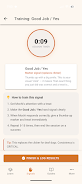

DeafPaw is a focused training app that helps owners teach hearing-impaired dogs using clear visual hand signals and structured practice. DeafPaw places visual cues at the center of every lesson, combining a customizable gesture library, step-by-step training plans, and on-device gesture recognition designed to confirm when your dog responds correctly. Whether you are starting with basic sit and stay commands or refining household cues for walking and recall, DeafPaw guides you through consistent signal creation and gradual introduction so both owner and dog learn the same language.
Core mechanics and training workflow
The app’s training workflow breaks lessons into short, repeatable sessions with defined goals and timing. Each session focuses on one command: creating the visual cue, demonstrating the motion, practicing the gesture with timed repetitions, and reinforcing the response with treats or praise. Controls are simple and tactile: tap to start a practice round, swipe to move between drills, and use the on-screen gesture editor to record or assign a movement to a command. Built-in timers and repeat counters help you maintain consistent intervals, which is essential for reliable visual conditioning.
Gesture recognition and feedback
DeafPaw includes gesture recognition that runs on-device to detect when you perform the assigned signal and when the dog appears to respond. The app gives immediate, clear feedback after each trial so you can see whether the gesture met the recognition threshold or needs clearer motion. Recognition sensitivity is adjustable to account for lighting and camera angles, and a short calibration step at the start of training helps match the system to your home environment. This feedback loop reduces guesswork and helps you fine-tune both the signal and your timing.
Progression and lesson structure
Lessons are organized into progressive levels that start with simple cues and increase in complexity as your dog demonstrates reliable responses. A typical progression moves from demonstration and shaping to distance, duration, and distraction training. The app records session success rates and suggests when to advance, repeat, or return to earlier steps. This scaffolding makes it easier to build dependable behaviors without overwhelming the dog or the owner.
Customization and accessibility
Custom signals allow you to design gestures that match your physical comfort and household space; you can rename commands, adjust gesture animation length, and set preferred confirmations. Accessibility is a priority: visual contrast options, larger on-screen controls, and clear written prompts make the app usable for owners with varying visual acuity or dexterity. DeafPaw’s instructions use plain language and stepwise examples so new trainers can follow along without prior experience.
User experience and visual style
The interface emphasizes clarity and calm visuals: large icons, muted colors, and concise text aim to keep training sessions focused and low-stress for both owner and dog. Each lesson includes short instructional text and an animated example of the hand signal to reduce ambiguity. Controls are intentionally simple so users can operate the app one-handed while handling a treat or leash, and audio cues are kept minimal because the app is visual-first by design.
Practice modes, replayability, and challenge systems
DeafPaw offers multiple practice modes to maintain engagement and improve consistency. Short repetition drills build muscle memory, while longer session modes introduce distractions and distance to challenge the dog’s focus. The app’s progression system rewards incremental improvement with suggested next steps rather than game-style points, encouraging steady practice over quick wins. Replayability comes from adjustable difficulty, the ability to remix signals, and the need to revisit earlier steps when introducing new environments or distractions.
Data, offline use, and privacy
Session logs track basic progress metrics—success rate, average response time, and cumulative practice minutes—so you can spot trends and tailor future lessons. Core lessons and your custom gesture library are available offline so you can train without an internet connection. Gesture recognition is designed to operate on-device where possible to protect privacy and keep performance consistent when you’re practicing outdoors or away from Wi‑Fi.
Limitations and recommendations
Like any training tool, DeafPaw depends on consistent practice and clear, repeatable signals from the owner; progress can vary by dog and environment. Gesture recognition performance may be affected by lighting, camera angle, and background clutter, so taking a few minutes to calibrate before practice is recommended. For complex behavioral issues, DeafPaw is intended to supplement, not replace, professional guidance from a qualified trainer or behaviorist.
Getting started
Begin with the app’s basic lesson set, create one or two simple custom gestures that feel natural for you, and follow the short calibration step. With regular short sessions and the progressive lesson structure, DeafPaw helps make visual training consistent and repeatable, giving hearing-impaired dogs a clear, dependable way to understand everyday cues.
Category: Lifestyle Publisher: JakeStudios File size: 34.00M Language: English Requirements: Android Package ID: com.jakestudios.deafpaw





















